
How GPS Works Without the Internet
You’re driving through the mountains when your phone unexpectedly loses service. No bars. No data. You freak out for a second because you believe your navigation is about to stop working. But when you check Google Maps, you see that little blue dot still traveling along the road and following your every move.
Wait, what?
How can your phone tell where you are when there is no internet connection? There is no data, no Wi-Fi, and nothing else. Doesn’t it feel like a magic trick? But here’s the thing that really surprises most people: GPS works even when there isn’t an internet connection. It always has and always will.
That’s not a mistake. Your phone isn’t acting odd. That’s how GPS was made to work, long before smartphones were invented. Your phone is talking to space itself, and it doesn’t require the internet to do so.
The Common Myth About GPS and Internet
I bet you’ve been thinking for years that GPS and the internet are pretty much the same thing when it comes to finding your way around. Like, in your thoughts, the phone uses data to find out where you are, right?
You’re not the only one. A lot of people think this, and to be honest, it makes perfect sense.
When you launch a mapping app, it loads those colored routes and names. When you look for a coffee shop, the results come up right away. It warns you about traffic congestion and road closures when you start navigation. The internet is needed for all of that. So, of course, your brain puts two and two together and says, “GPS needs the internet too.”
But that’s when the trouble starts. What you’re witnessing is really two systems that are functioning together. The maps app needs the internet. The nice pictures use the internet. The business listings and traffic updates use the internet.
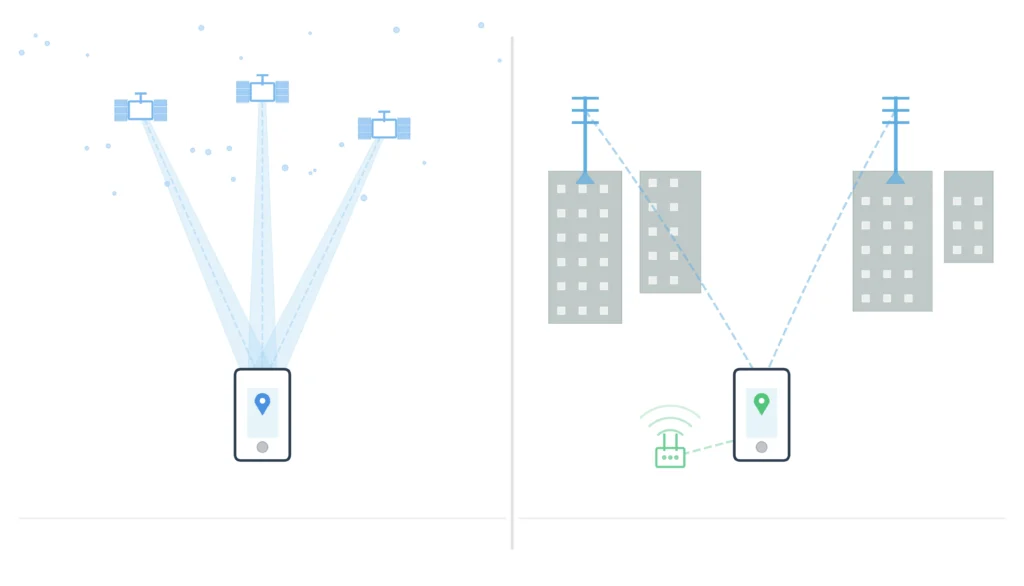
But what about GPS? GPS is a whole other thing.
In a way, the internet helps your phone show you what’s going on around you. But GPS is what tells your phone where that place really is. One person makes the map. The other one shows where it is.
Does GPS need the internet? Nope. Never did.
A Simple Explanation of What GPS Is
The name “Global Positioning System” sounds fancy and technical, yet the idea behind it is rather simple.
There are dozens of satellites orbiting around the Earth in certain orbits high up in the sky. These satellites were set up decades ago, when people still used paper maps and asked for directions at petrol stations. They are part of something that has become almost sacrosanct in how we get about the world, a system that has been working the same way for generations without anyone knowing it.
The only thing each satellite does is send out a signal. That’s all. It just sends out the same message again and over: “Hey, I’m here, and this is what time it is.”
These signals are picked up by your phone. It doesn’t transmit anything back; it merely listens. It’s like tuning into a radio station, but the station is 12,000 miles above your head and instead of music, it’s telling you where it is in space.
When your phone gets signals from at least four satellites at the same time, it can do some rapid math with the time stamps from each transmission. The arithmetic works out how far away each satellite is and then tells you exactly where you are on Earth.
You don’t need the internet. No need for a data plan. Your phone is just silently listening to the universe, like people have always gazed up at the stars to find their way. But now the stars talk back.
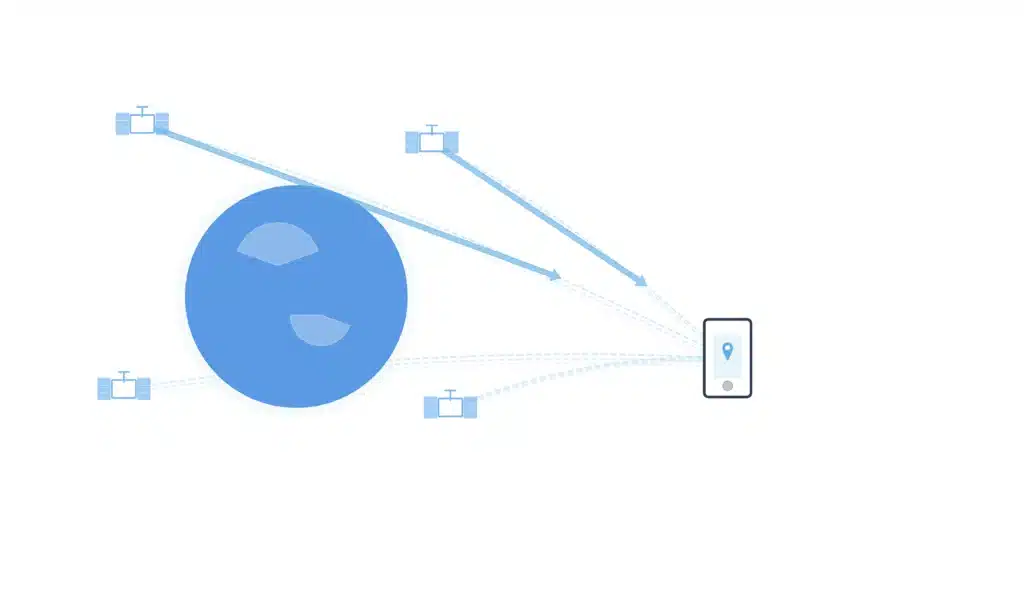
How your phone can find your location without the internet
Imagine that you are in a field with your phone set to airplane mode. You can’t connect to the internet or your phone, so you’re completely shut off from the digital world. But your phone can still tell exactly where you are.
This is how it happens, step by step.
First, the signals from GPS satellites in the sky are always being sent out. They don’t know you’re there. They don’t mind. They basically send out a message to anyone who would listen: “I’m satellite number 7, this is where I am and what time it is.”
Second, these signals go to your phone’s GPS chip. It doesn’t need to send any data back or connect to anything. It’s just receiving, like putting raindrops in a bucket.
Third, your phone does something called trilateration. Don’t be afraid of the word; it’s not as hard as it sounds. You should know that you’re 100 miles from New York, 80 miles from Boston, and 60 miles from Philadelphia. There is only one place where all three of those distances are correct. That’s where you are.
Your phone accomplishes the same thing with satellites. It can tell how far away each one is by how long it took for their signals to get there. Where do all those distances meet? That’s where you are.
Fourth, the mapping app puts that small blue dot on the map once your phone knows where you are. You can see streets and landmarks if you have maps saved on your device. You might only see a blank screen with a dot if you don’t. But that dot knows exactly where it is, no matter what.
There was no internet involved in any phase of this operation. The satellites and your phone had a private discussion that the internet wasn’t a part of.
What the Internet Really Does with Maps
So why do people think GPS needs the internet if it doesn’t?
Because mapping apps are incredibly effective at making you need the internet for everything else they do.
The first thing that loads when you launch Google Maps or Apple Maps is the map itself. This includes the roads, buildings, parks, and everything else you see. The firm keeps the graphics on its servers, and your phone downloads them in real time. That needs to be connected to the internet.
When you type “pizza near me” into your phone, it transmits the request to a server, which then sends back a list of eateries. The web.
When you start navigation and it says, “There’s heavy traffic ahead, find a new route,” it’s getting real-time data from millions of other phones on the road. The web.
When do you see reviews, pictures, or business hours? Internet, internet, internet.
The internet makes your maps smart, up-to-date, and fun to use. It helps you understand where you are. But it doesn’t tell you where you are.
GPS has been doing something the same way since before apps were invented, and that’s its job. Honestly, that regularity is comforting in some way. GPS merely keeps doing what it’s always done, even while everything else changes and needs the newest version.
Why GPS Still Works When You’re in Airplane Mode
You may have seen this on planes. You do what you’re meant to do and turn on airplane mode, which cuts off all your connections. But you can still see your location moving across the map in your maps app when you’re in the air. It shows the plane’s path.
How? You’re really flying through the skies. How is your phone still working?
Airplane mode doesn’t turn off GPS, though.
Airplane mode turns off your phone’s cellular, Wi-Fi, and Bluetooth connections. It stops your phone from sending or getting data over networks. But GPS can only receive signals. Your phone isn’t sending anything to the satellites; it’s just listening.
The FAA and airlines don’t think GPS is a concern because it can’t mess with the systems on planes. Your phone is not actively talking to anything; it is passively collecting signals from space.
So, yes, you can see yourself fly across whole states, with the small dot moving over cities, rivers, and mountains, all while you’re not connected to the internet. When you think about it, it’s kind of poetic.
How GPS navigation works while you’re not offline
Now this is when things get really useful.
Before you leave home, you can download full maps of cities, states, or nations. You can accomplish this with Google Maps, Apple Maps, and other apps like Maps.me. You won’t need to use any mobile data to get around after the maps are saved on your phone.
The maps are saved on your device. You can always get a GPS signal for free. When you put them together, you get full turn-by-turn navigation without an internet connection.
People use this all the time when they hike in places where there aren’t any cell towers. You download the trail map ahead of time, and your phone uses satellites to keep track of where you are on the path. You don’t need a data plan, you won’t have to pay for roaming, and you won’t have to worry about the signal.
The same is true when traveling abroad. Before you leave your hotel’s Wi-Fi, download the city map. This way, you can get around in a foreign location without having to obtain a local SIM card or pay for international data.
Offline GPS can still help you find your way when you’re on a road trip in the desert, sailing on the ocean, or hiking through the mountains. It reminds us that systems that don’t need to be connected all the time are frequently the most reliable.
GPS vs. Internet Location: A Big Difference
This is something that confuses people: your phone can really find out where you are in two ways.
One way is through satellites, like we’ve been talking about. This is the tried-and-true way. It works anywhere on Earth where you can see the sky. It takes a few seconds to lock on, but once it does, it’s accurate to within a few meters.
The other way is to use a network to find your location. Your phone checks neighboring Wi-Fi networks or cell towers and says, “Okay, I’m connected to this tower, which means I’m probably in this area.” This is faster than GPS but much less accurate; it can be off by hundreds of feet.
When you’re inside or in a city with towering buildings, your phone often employs both methods at the same time to obtain the best idea of where you are. But GPS keeps working even when the internet is down.
Location-based services on the internet are quick and easy. GPS is correct and works on its own. They have distinct uses, and it’s important to know which one you’re using when you need to know exactly where you are or when you’re in a remote area.
When GPS Without the Internet Doesn’t Work as Well
GPS is great, but it’s not always right. It has trouble in some situations, and it’s good to know what they are.
GPS doesn’t operate very well inside. Concrete and steel don’t let satellite signals through very well. Have you ever noticed that your mapping app gets lost in a mall? That’s the reason. Your phone changes between Wi-Fi and cell tower locations, which is why it sometimes believes you’re in the wrong place.
When you’re in a city with tall buildings, GPS signals bounce off of them before they get to your phone. This makes strange mistakes happen, like your location moving around or going down the wrong street. Engineers term this the “urban canyon effect.”
It’s clear that tunnels fully block satellite communications. Your location freezes till you come out.
Heavy woodland can also get in the way, but not as much as buildings do. Some of the signal is absorbed by thick tree cover.
Bad weather, such thick clouds and heavy rain, can make GPS signals a little weaker, although this is typically not a big deal. It is far less affected by the weather than by physical barriers.
The most important thing to remember is that GPS needs a good view of the sky. The more satellites your phone can observe, the more accurate your location will be. If you block that vision, accuracy goes down.
Real-Life Examples of GPS That Doesn’t Need the Internet
Let me show you some examples of when GPS without the internet can literally save your life or your vacation.
You’re on a plane and seated by the window. You open your mapping app and watch as you move smoothly over the land. There is no Wi-Fi on the plane and no cell coverage at 35,000 feet, but you can view every town you fly over, keep track of your progress, and guess when you’ll get there. You and the satellites are the only ones there.
You’re walking on a trail in the woods. There hasn’t been cell service for miles. But the downloaded trail map on your phone shows you exactly where you are. You can verify where you are and see which way leads back to camp when you get to a fork in the road.
You’re driving across the countryside, where highways connect little villages. You might not see a cell tower for an hour at a time. But GPS constantly tracking you and guiding you, so you never get lost.
You’re sailing away from land. You can see the coast, but it’s far away. Clearly, there is no Wi-Fi out here. But GPS tells you exactly where you are, helps you find your way, and stops you from wandering into shipping lanes.
In each of these situations, GPS functions the way it was designed to work decades ago: on its own, reliably, and always listening to the sky.
Does GPS ever need the Internet?
Let’s be honest with each other.
GPS doesn’t need the internet at all to do its main job, which is to find your location. Hasn’t happened and won’t happen.
But what about all the things that make modern navigation effective and easy? Yes, you need the internet for most of that.
If you haven’t downloaded the maps, you need the internet to load them. You need the internet to look up businesses or addresses. You need the internet to get real-time traffic data. You need the internet to get live ETA updates. You need the internet to see street view, read reviews, and choose other routes based on the weather.
GPS gives you the exact coordinates. The internet makes those coordinates into a real-life useful experience.
So, can GPS work without data? Yes, 100% assured. Will you be able to use modern navigation without data? No, not unless you plan ahead using maps that don’t need the internet.
It’s more like a partnership. GPS conducts its job of finding places. The internet makes things easier in the current world. They all work together to make navigation easy.
Why it’s important to know how GPS works nowadays
You might be saying to yourself, “Okay, cool, but why should I care how this works?”
It’s easier to get ready when you know the difference between GPS and the internet.
You know to download offline maps ahead of time when you’re going to a remote place. You don’t freak out when your data goes out because you know GPS will still work. You know that turning on airplane mode doesn’t mean you can’t keep track of your trip.
It also matters for safety. If you’re ever in an emergency and your networks are down or you’re outside of cell range, knowing that GPS still works means that your phone can still help you find your way to safety or communicate your whereabouts.
It’s good to know that GPS is passive for privacy reasons. Your phone gets signals from satellites, but it doesn’t send your location to them. Any tracking of your whereabouts that you’re worried about is happening through apps and internet connections, not GPS itself.
And to be honest, it’s kind of beautiful to know how the old, reliable systems that still work under all our new technology work. GPS was made to last, work anywhere, and only need a view of the sky. In a world where everything needs upgrades, subscriptions, and internet access, GPS is nice since it doesn’t change.
Last Thoughts
There it is: the plain fact that shocks almost everyone who hears it.
Your phone talks to the universe. Satellites that have been circling Earth for longer than most of us have been alive send out signals that let people talk to each other. That conversation doesn’t include the internet. It never was.
Once you understand it, it’s not hard to see why GPS works without the internet. Satellites send out signals, your phone picks them up, math happens, and your position shows up. Neat, stylish, and dependable.
You’ll understand why your phone loses service yet still knows exactly where you are the next time it happens. You’re not seeing a bug or a clever way to get around it. You’re watching a system perform just as it was meant to: it gets signals from the sky, figures out where it is, and stays constant even when everything else goes dark.
GPS doesn’t need the internet because it was designed when people wanted to make systems that could work on their own and be trusted no matter what. And decades later, it still does its job, silently and regularly, connecting us to satellites in the sky and asking for nothing in return but a clear view of the stars.
When you think about it, it’s really cool, right?
