
Your Phone GPS Acts Weird Indoors – Here’s Why It Happens
You’re in a mall and looking for a certain store. You take out your phone, launch the map app, and wait. Your phone says you’re in the middle of a street two blocks away. You get a new start. You just walked into a coffee shop you passed five minutes ago. What is happening?
You’re not the only one who has observed that your phone’s GPS doesn’t work well inside. Every day, millions of individuals go through this at airports, malls, workplace buildings, and even at home. Your location changes all the time, the blue dot moves around, and navigation stops working almost completely.
Why does the accuracy of GPS change so much when you go inside a building? Let’s make it easy to understand.
How GPS Normally Finds Your Location
Your smartphone’s GPS works really well when you’re outside on a clear day. Your phone can tell you where you are within a few meters.
Here’s how it works: GPS satellites that orbit the Earth send signals to your phone. These satellites are always sending out their location and the time. Your phone gets signals from at least four satellites, figures out how long each signal took to get there, and then utilizes that information to figure out where you are.
This technique works great in open areas like parks, streets, and beaches. The signals go straight from space to your phone, and your location shows up right where you are.
Why GPS Needs a Clear View of the Sky
The issue about GPS is that it needs to be able to see satellites. For your phone to see those satellites in the sky, it needs a clear, direct path.
It’s like trying to see the light from a flashlight. You can see a flashlight plainly if someone shines it at you from across a field. But if you go behind a wall, the light won’t be able to reach you. GPS signals work in the same way.
Your phone can see the sky well when you’re outside. You can see several satellites, the signals are strong, and your location is determined correctly. But as soon as you walk into a building, everything changes.
How Buildings Block GPS Signals
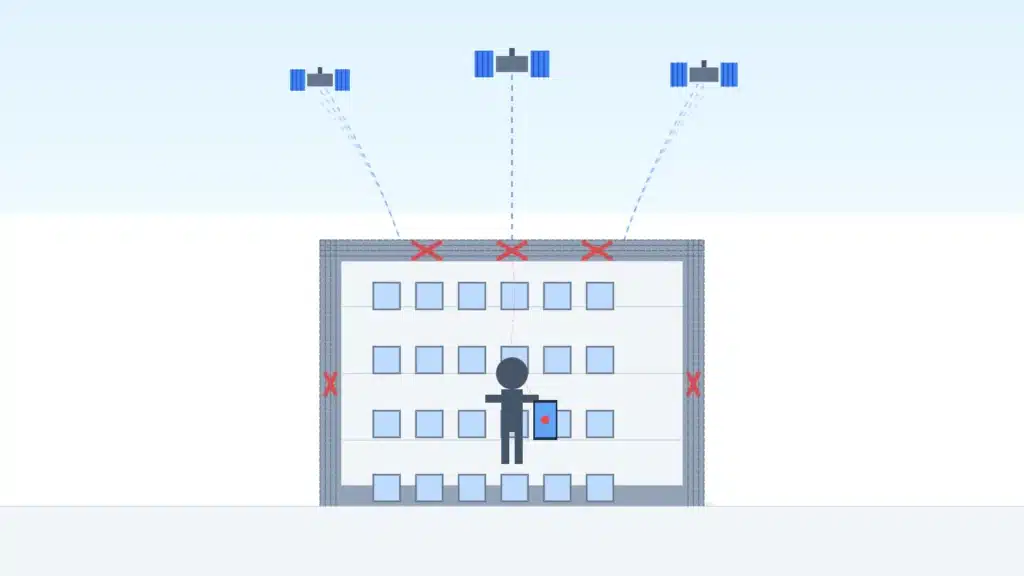
Buildings block GPS signals. And new buildings are especially excellent at suppressing these signals.
Walls made of concrete, metal beams, thick glass windows, and sturdy roofs all keep people out. By the time GPS signals reach the surface of the Earth, they are not very strong. These things can’t get through these materials like your Wi-Fi or cell phone impulses can.
The roof alone conceals most GPS satellites from view when you enter into a mall, an office building, or your own home. Your phone can’t connect to the satellites it needs when there are walls, floors, and other buildings above you.
People often complain that GPS signals are weak within buildings. The signals either can’t get to your phone at all, or they get there so weakly that your phone has a hard time using them.
Signal Reflection Inside Buildings
But wait, your GPS can sometimes show you where you are when you’re inside. It’s just not right. Why?
This happens because the signal bounces back. Some GPS signals do get into buildings, but they don’t go in straight lines anymore. Instead, they hit walls, ceilings, metal structures, and glass surfaces before they get to your phone.
Imagine yelling in a canyon and hearing your voice come back to you from different places at different moments. Your phone has a similar problem with GPS signals when you’re inside.
Your phone gets signals from strange angles and at strange times as they bounce about inside a building. The phone tries to figure out where you are based on these mixed-up signals, but it usually gets it wrong. You can look like you’re in a different building, across the street, or moving from one place to another every few seconds.
Why GPS Accuracy Drops in Cities and Indoors
Have you ever thought about why being in the incorrect place inside is an even bigger problem in downtown areas? The urban canyon effect is what this is called.
GPS signals bounce off skyscrapers in cities with towering buildings and narrow streets, just like light bounces off mirrors. Your phone might even get signals that bounced off of many buildings before reaching you.
The situation gets worse when you go inside a building in that area. The building you’re in is blocking signals to your phone, and signals from nearby buildings are bouncing off of it. What happened? When you’re inside, your phone’s GPS stops working almost completely.
Dense city areas are among of the worst places for GPS accuracy in buildings. Your phone has a tougher time getting clear, direct signals when there are a lot of buildings surrounding you.
How Phones Try to Estimate Location Indoors
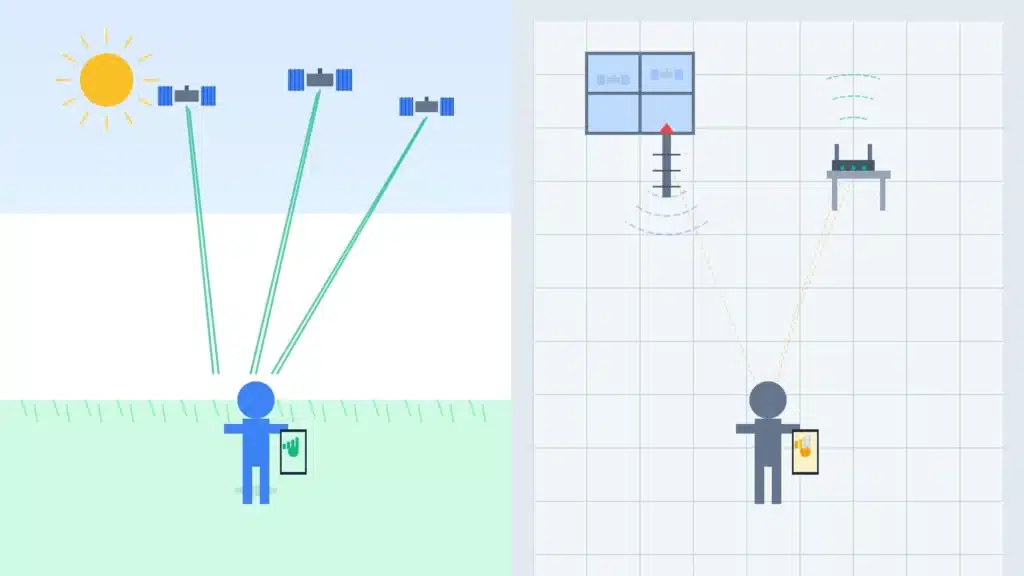
Your phone isn’t absolutely useless when you’re inside. When GPS stops working, it finds other ways to figure out where you are.
The most frequent backup is Wi-Fi location. Your phone looks for Wi-Fi networks nearby, even ones you aren’t connected to. It looks for networks and compares them to a huge database of known Wi-Fi spots. Then it figures out where you are depending on which networks are stronger.
Cell towers are also helpful. Your phone connects to neighboring cell towers, and by evaluating the strength of signals from several towers, it can figure out where you are within a few hundred meters.
Some big buildings even have Bluetooth beacons placed just to help people find their way around within. Airports and huge malls sometimes employ these to help people find their way around their buildings more easily.
But here’s the important part: none of these are GPS. They are ways to go about. They mean, “I can’t see the satellites, so I’ll guess based on what I can see.”
Why Your Location Jumps Around Indoors
This explains the annoying thing you’ve probably seen: your location dot moving around inside like it’s not connected to anything.
Your phone is always jumping between multiple ways to find its location. It thinks you’re in that place when it gets a weak GPS signal through a window. Then it loses that connection and turns to Wi-Fi positioning, which may put you in a completely other spot. Then a strong signal from a mobile tower comes in, and your location changes again.
The accuracy and update speeds of each approach are varied. The outcome seems like a mess, as if your phone can’t decide where you are. Your phone is actually working hard with insufficient information, doing the best it can with obstructed signals and rough positioning methods.
Places Where GPS Is Least Accurate
Some places are just awful for GPS. Here are the worst spots for phone locating indoors if you’ve ever wondered where your phone is:
Shopping malls include thick roofs, many storeys, and complicated design. Your GPS usually stops working as soon as you enter through the door.
Airports contain huge buildings made of steel and concrete, and some of them even have parts that are underground. Almost all GPS transmissions are blocked by terminal buildings.
Underground parking garages are clearly places where danger might happen. GPS satellites can’t reach you at all because there is concrete on all sides and dirt above you.
Subway stations and tunnels take you all the way underground. That much rock and concrete will block any GPS signal.
Big office towers with steel frames and reflecting glass mess with signals. The urban canyon effect outside and the building interference within work together.
When GPS Works Better Indoors
GPS doesn’t always stop working entirely inside. Some places are better for GPS than others.
Near windows is the greatest place to obtain a signal. Your phone might be able to get enough satellite signals to tell you where you are if you are standing by a big window that looks out at the sky.
In some newer structures, glass roofs and atriums let enough signal through for basic location. Shopping malls with food courts that are open to the sky frequently have better GPS than those that are completely closed off.
Open hallways and wide passageways near the outside walls are better than deep rooms within. The closer you are to the outside, the higher your odds.
Sometimes, especially in large buildings when you’re above some of the other buildings, the upper floors get better signals than the ground levels.
Is Indoor GPS Ever Fully Accurate?
The honest answer is? No, not really. Not yet.
The way GPS works right now just wasn’t made for usage inside. The satellites work best in open skies. Their transmissions can’t consistently get through modern buildings.
But the technology for indoor positioning is getting better. Some systems use GPS along with Wi-Fi, Bluetooth, and even smartphone sensors like accelerometers and compasses to make indoor maps that are more precise.
Some big places are starting to put in special interior navigation systems. Some big airports, hospitals, and retail malls have their own applications with indoor maps that don’t use GPS at all.
But what about getting around within buildings every day? Your regular phone GPS will keep having problems until new technologies become more common.
Tips to Improve GPS Accuracy Indoors
You can’t repair the main problem, but you can make it more likely that you’ll get a usable location reading:
Get closer to windows or doors. Just a few steps toward the outside can make a difference.
Even if you’re not connected to a network, turn on Wi-Fi. Even in airplane mode, Wi-Fi positioning works better when Wi-Fi is turned on.
Go outside for a minute if you need a good beginning place. Go outside and let your GPS latch onto satellites. Then go back inside. Some apps will recall where you were last seen.
To calibrate your phone’s compass, move it in a figure-eight shape. This makes direction detection more accurate, which can aid with navigation even when position accuracy is low.
When you can, use navigation apps that are particular to the building. Many big airports and malls have their own apps that show you where things are inside.
Be patient. When you initially walk into a building, let your phone a minute to adjust and find other ways to position itself.
Why Understanding Indoor GPS Matters
It’s not simply interesting to know why GPS doesn’t operate properly indoors. It really matters in real life.
When you’re trying to go about a big retail mall or airport, knowing what you can and can’t do will help you plan better. You know to search for signs and maps near the entrances, where GPS still works, instead of relying on navigation deep within.
For people who are visiting cities they don’t know, knowing to go outside or near windows for precise directions might save time and trouble.
Emergency services are also attempting to improve interior positioning because it might be very important to know where someone is inside a big structure during an emergency.
More buildings will have better navigation as indoor positioning technology gets better. But for now, knowing why your GPS doesn’t operate well indoors can help you get past its problems.
Final Explanation
So here’s the simple truth: GPS doesn’t operate well indoors because it needs a good view of the sky to work.
The roofs, walls, and floors of buildings obstruct satellite transmissions. The impulses that do get inside bounce about, which makes things even more confusing. Your phone turns to backup systems like Wi-Fi and cell towers, which are less precise and don’t always update.
The consequence is the hopping, drifting, and wrong location that you’ve seen many times before. Your phone isn’t broken. The GPS satellites aren’t horrible. It’s just how it is when you’re attempting to get signals from space while being surrounded by concrete and steel.
If your phone tells you you’re in the wrong place within a building again, you’ll know exactly why and how to acquire a better reading. Go to a window, turn on Wi-Fi, or go outside for a minute. Your GPS will be grateful.
And don’t forget that GPS is an excellent piece of technology that changed the way we find our way. It just wasn’t meant to be used inside. But if you know how it works and why it has trouble, you can get around more easily, whether you’re outside in the open air or inside the nearest mall.
