
How to Use Offline Maps on Your Phone: A Complete Guide to Getting Around Without the Internet
Imagine you’re on a road trip through the mountains and your phone signal suddenly goes out. No bars. There is no internet. But when you look at your navigation app, something surprising happens: your blue dot is still traveling along the map, and your phone is still advising you where to turn.
How does your phone still find its way without the internet? How can maps work without a data connection when we’re so used to everything needing one?
You’re not the only one who has ever pondered about this phone wizardry. This post will explain in simple words how offline maps function on your phone so that everyone can understand.
The Confusion That People Have About Maps and the Internet
Let’s get rid of a significant misconception right away. A lot of individuals fear that their phone’s map software won’t work at all without the internet. When people use these apps, they think they are always getting information from the internet, like when they view a video.
But here’s the thing: your mapping app and your internet connection are two separate systems, and they don’t always need each other.
GPS satellites that orbit the Earth, not cell towers or Wi-Fi, are what let your phone know where you are. You can download the map and save it right on your phone. The main reason you have an internet connection is to load updated map data, show traffic in real time, or read restaurant reviews.
When you use maps without the internet, you are using two things: saved map data on your phone and GPS signals from space that tell you where you are. No need for a data connection.
What Offline Maps Really Are
When we talk about offline maps for phones, we’re talking about maps that you can download and save directly to your phone’s memory. It’s like having a paper map that you can touch and interact with inside your device.
Do you remember when folks used to print out MapQuest directions before they left? Or stored road maps in their cars? The latest form of offline maps is digitized, searchable, and shows your location in real time.
When you download a region to use offline, your phone remembers all the streets, roads, landmarks, and other things of interest in that area. This map data is stored in your phone’s memory and is always available, whether you have internet access or not.
With smart compression, the streets of a whole city may fit in just a few hundred gigabytes of space.
How Your Phone Still Knows Where You Are
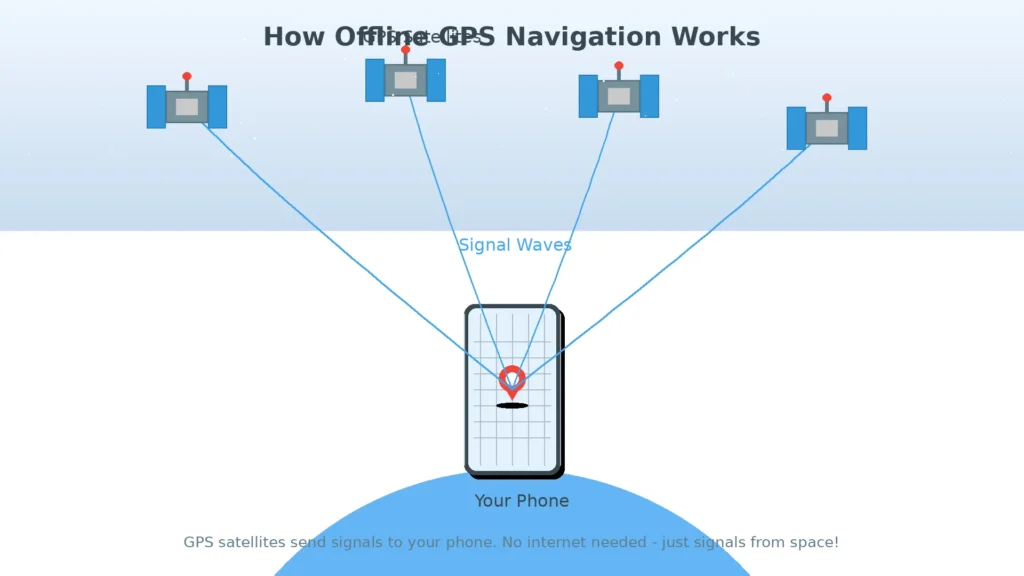
How does your phone know where you are if there’s no internet? The answer is satellites in space.
These satellites are always giving out signals as they hover around Earth in space. Your phone has a GPS receiver that picks up these signals. Your phone knows exactly where it is by getting signals from more than one satellite at the same time.
You don’t have to send anything back to GPS satellites. They’re sending out signals, and your phone is picking them up. You don’t require an internet connection because it’s a one-way chat.
Your GPS works the same way whether you’re online or not when you use offline navigation apps. Not from cell towers, but from space, do GPS signals arrive. Your GPS may still figure out where you are, even when your phone is in airplane mode.
This is why it is feasible to follow someone’s whereabouts without their data. Your phone’s GPS chip works on its own, separate from your data connection.
How Navigation Works Without Internet
Let’s put it all together now. Your phone has a map on it. GPS lets your phone know where you are. But how does it tell you how to get there without being connected?
Your phone saves all the roads and streets in the area you downloaded. Your phone doesn’t need to ask the internet for information when you input a destination. It already has it.
Your phone does math right there on the gadget. It uses recorded road information to find out the best way to get from where you are to where you want to go. Your GPS position changes as you drive, and the app notifies you when to turn.
It’s surprisingly quick to calculate a route offline because your phone’s processor is so powerful. It can look at thousands of possible routes in only a few seconds.
What You Can Do With Offline Maps
Offline maps are quite powerful. Here’s what you can do without the internet:
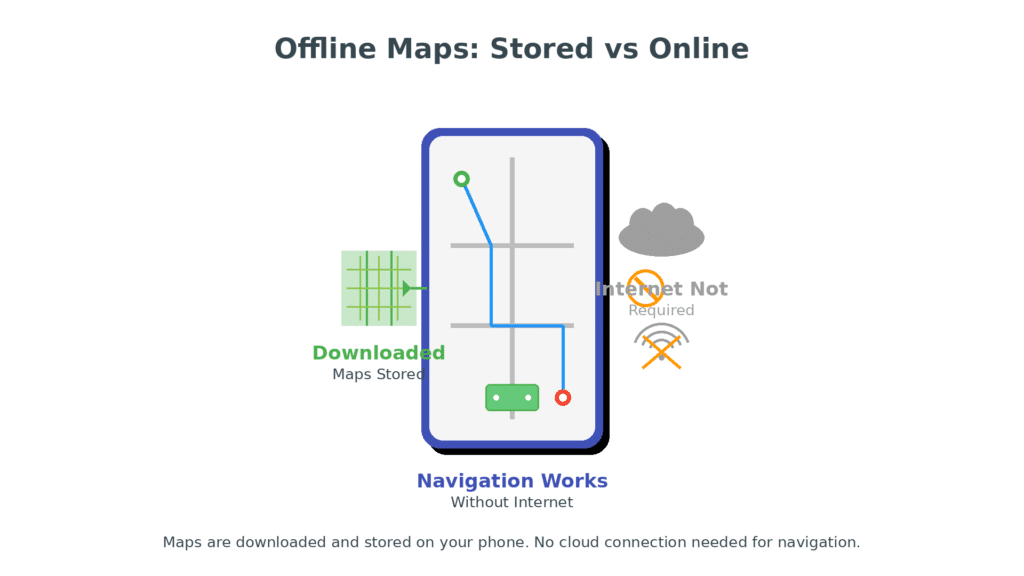
Driving directions are totally accurate. Your phone tells you how to get to your destination step by step along any route in the area you downloaded. You get correct arrival times, the map updates as you walk, and the voice directions work.
All of the walking routes are open. Are you walking around a new city? Your phone will show you how to go to any saved location or landmark by walking.
Location tracking keeps going without a hitch. The blue dot that shows where you are keeps moving correctly because GPS doesn’t need the internet.
You can still get to saved places. Your offline map shows places you’ve starred before.
All the street names and basic information are there. Your downloaded data include all the basic information about highways and landmarks.
What Offline Maps Can’t Do Without the Internet
Let’s talk about what doesn’t work when you use maps without the internet:
You need the internet for live traffic updates. Your phone can’t tell you where accidents occur or which roads are busy.
The business information may be out of current. Your map can show you where eateries are, but it can’t tell you what time they open or whether they’ve closed.
Real-time rerouting has some limits. Your phone can recalculate if you miss a turn, but it won’t know about road closures that have happened recently.
New places won’t show up. You won’t see any recent updates until you download new map data.
How Your Phone Stores Map Data
Map data is kept in small chunks called “map tiles,” which are like cutting a big printed map into hundreds of small squares. You choose the areas you want, and your phone downloads the tiles for those areas.
To save space, the information is very compressed. A detailed map of a big city might only need 500MB to 2GB of space, which is about the same as a few music albums.
Your phone shows different versions of these cached map tiles when you zoom in and out. When you zoom out, you can only see main highways. When you zoom in, you can see every street name.
Why Offline Maps Are Helpful for Traveling
Knowing how to use your phone’s navigation features when you’re not connected to the internet brings up new options for travelers:
Traveling to the mountains and the countryside is less stressful. No signal in the mountains? Your downloaded maps and GPS satellites will take care of you.
Traveling abroad saves you money. Download maps of your location before you leave home so you don’t have to pay for pricey roaming data.
There is no concern with “flight mode” circumstances. Your maps will still work on aircraft and in hospitals.
Tunnels and underground places operate well. When you come out, GPS picks up where you left off and shows you any loaded map region.
Data limits won’t stop you. Navigation doesn’t cost you any of your monthly allowance.
Does Google Maps Work Offline?
Yes, Google Maps works without an internet connection, but you have to download the maps first.
You can launch Google Maps and look for the place you want when you have internet. Tap on your profile image, then “Offline maps,” and then “Select your own map.” Pick the area and download it. The map stays on your phone for roughly a month.
Google Maps works great even when you’re not connected to the internet. You can search for places, obtain turn-by-turn driving directions, and find walking paths. The interface looks the same whether you’re online or not.
What are the limits? There are no live traffic updates, no instructions for public transit, no bicycle routes, and no business information that is up to date. But it works great for basic navigation.
Other apps include Maps, HERE WeGo, and Apple Maps.also let you use them without being connected to the internet.
How Accurate Offline Navigation Is
Good news: offline maps work just as well as online maps for basic navigation. Either way, the GPS accuracy is the same because it’s coming from the same satellites.
Your position accuracy is usually between 15 and 30 feet when you’re outside, whether you’re connected to the internet or not. In cities with big buildings, accuracy could drop to roughly 50 feet. This is true whether you are online or offline.
The maps are just as accurate as when you first got them. The main problem is that offline maps don’t show modifications that were made after you downloaded them. That’s why you should refresh your downloaded maps often.
Tips for Using Offline Maps Properly
Want to get the most out of offline navigation? Here are some useful tips:
Get them before you need them. While you’re at home on Wi-Fi, download the areas you’ll be going through.
Keep it up to date. When you’re connected to Wi-Fi, let your maps app update the regions you’ve downloaded so you get the most up-to-date information.
Keep GPS on. Offline maps can only find your location if location services are turned on.
Save crucial places ahead of time. While you have internet, star your hotel, meeting points, and other important places.
Download bigger areas. If you’re going to a city, download the area around it as well. You never know when you’ll have to take a different route.
Check your storage space. Before you download huge areas, make sure you have adequate free space.
Turn on battery conservation mode. GPS uses a lot of battery. Think about carrying a charger that you can take with you.
Offline maps vs. online maps
Internet: You need data to use online maps. You don’t need the internet to use offline maps.
Updates: Online maps always reflect the most up-to-date information. Last download is when offline maps are up to date.
Traffic: Maps on the internet display traffic in real time. Standard routes are used by offline maps.
Search: You can search for anything on online maps. Offline maps only look for data that has been downloaded.
Business Information: Online maps offer the hours and reviews for the business. Maps that aren’t online only contain basic information.
Storage: Online maps use data but don’t save it. Offline maps require space on your phone.
Battery: Maps that are online use up battery power faster. Maps that aren’t online work better.
Dependability: Online maps depend on a signal. You can use offline maps anyplace you can see the sky.
Final Explanation: How It All Works Together
Offline maps function by using three things: map data that is stored on your phone, GPS signals from satellites, and smart software that connects the two.
When your phone is linked to Wi-Fi, it downloads and saves the maps, which include all the routes and places. They’re data files that take up space yet are always ready.
GPS satellites that circle the Earth inform you where you are. Your phone’s GPS receiver picks up signals from these satellites all the time. You don’t need the internet; you simply need to see the sky.
When software puts these elements together, the navigation magic happens. It gets your GPS location, puts it on top of saved maps, figures out the best routes using road data, and tells you where to turn without connecting to the internet.
The Internet keeps everything up to date and offers new functions. New traffic, new evaluations, and new road changes all need the internet. But do you know where you are and how to get there? That works great when you’re not connected to the internet.
Knowing how phone maps operate offline gives you flexibility and confidence, whether you’re traveling abroad, trekking in a rural area, or just trying to save data. You can go anywhere with your maps and GPS activated, even if you don’t have a signal.
Your phone can do more than you thought it could. You now know why that blue dot keeps moving even when your internet is down.
